TypeScript Support
CASL is written in TypeScript and this brings several benefits:
- better safety as you can control what actions and subjects can be used
- better IDE integration as you can get hints on what classes you can use and arguments you need to pass inside
- easier library support, we can forget about synchronization issues between
.d.tsand.jsfiles
So, let's play around with them
Minimum supported TypeScript version is 3.8.3. CASL uses
export typesyntax
Permissions inference
Ability class and createMongoAbility factory function accepts 2 optional generic parameters:
import { createMongoAbility, Subject, MongoQuery } from '@casl/ability';

type PossibleAbilities = [string, Subject];
type Conditions = MongoQuery;

const ability = createMongoAbility<PossibleAbilities, Conditions>();
Subjectis a special type that represents all possible subjects thatAbilitycan accept. So, it'sobject | string | Function | undefined.
Don't be scared by the complexity, createMongoAbility uses that types by default, so the example above is the same as the one below:
import { createMongoAbility } from '@casl/ability';

const ability = new createMongoAbility();
These types are enough to protect you from passing wrong arguments but you can go further and make them even stricter. To illustrate how, let's consider a blog application, which has User, Article and Comment entities with the next user's permissions:
- can
create,update,deleteownArticleorComment - can
readanyArticle, anyCommentand anyUser
So, let's translate this to CASL by specifying all possible actions and all possible subjects as generic parameters:
import { createMongoAbility } from '@casl/ability';

type Actions = 'create' | 'read' | 'update' | 'delete';
type Subjects = 'Article' | 'Comment' | 'User';

const ability = createMongoAbility<[Actions, Subjects]>();
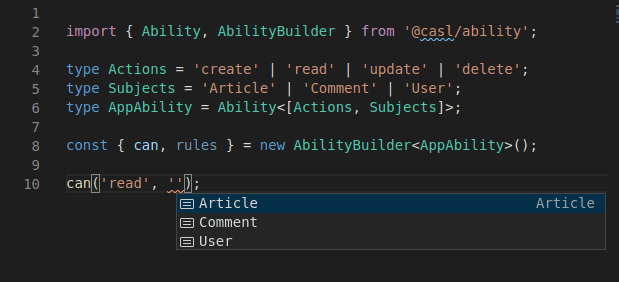
If we try to type ability.can( in VSCode (or other TypeScript supported IDEs), it provides hints:

The same happens when you try to specify the 2nd argument:

The same behavior works for AbilityBuilder and defineAbility function:
Infer subject types from interfaces and classes
You can also specify interfaces as subjects:
import { createMongoAbility } from '@casl/ability';

interface Article {
  id: number
  title: string
  content: string
  authorId: number
}

interface User {
  id: number
  name: string
}

interface Comment {
  id: number
  content: string
  authorId: number
}

type Action = 'create' | 'read' | 'update' | 'delete';
type Subject = Article | Comment | User | 'Article' | 'User' | 'Comment';

const ability = createMongoAbility<[Action, Subject]>();

ability.can('read', 'Article');
ability.can('write', 'Article'); // error because non-existing action name
ability.can('update', 'Coment') // error because of typo
and classes:
import { createMongoAbility } from '@casl/ability';

class Article {
  id: number
  title: string
  content: string
  authorId: number
}

type Action = 'create' | 'read' | 'update' | 'delete';
type Subject = typeof Article | Article;

const ability = createMongoAbility<[Action, Subject]>();

ability.can('read', Article);
ability.can('update', new Article());
This may be a bit routine to specify all possible subject types, especially if you have more than 3 of them. To make it easier, CASL provide InferSubjects typescript helper which can infer subjects from tagged unions (this helper checks kind and special __caslSubjectType__ properties in order to determine the tag)
__caslSubjectType__is set bysubjecthelper, to learn more check Subject type detection
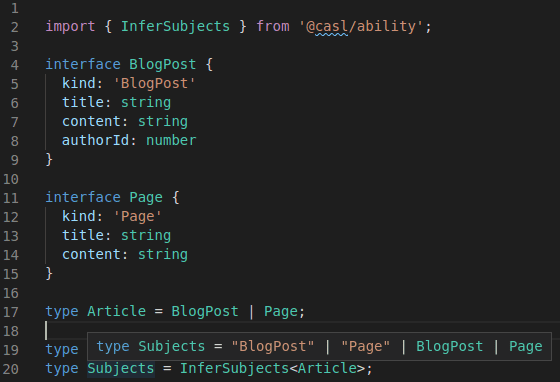
classes
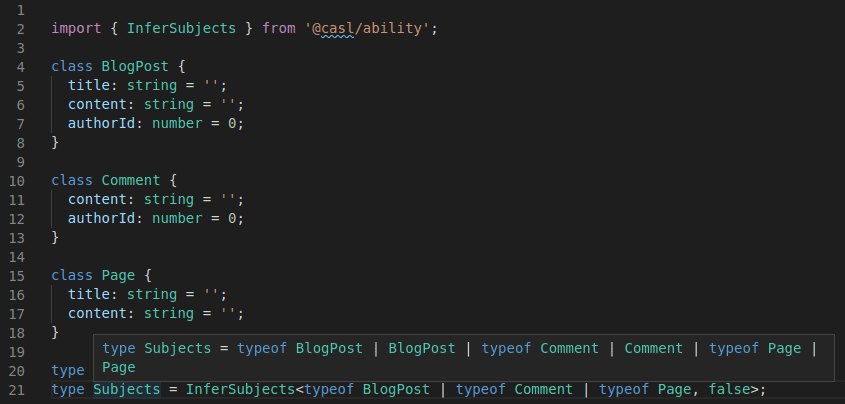
and even discriminated classes (you need to pass true to the 2nd generic parameter of InferSubjects).
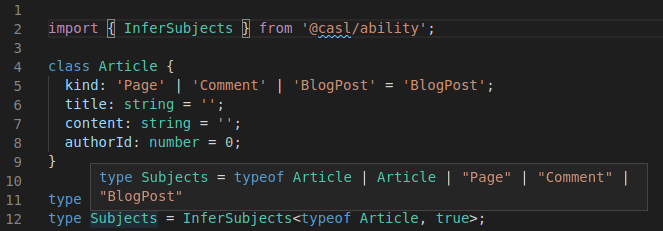
The same parameter allows to infer modelName static property from classes (in case you want to use strings and not classes to check on subject type)
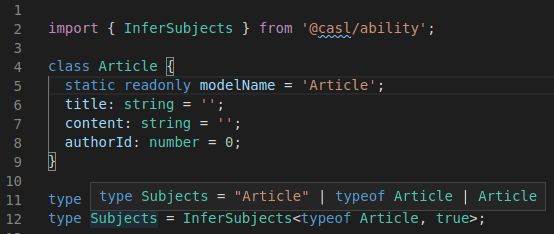
Moreover, the same behavior also works in complementary packages! So, you will get hints for React's Can component, Vue's $can function, Mongoose's plugins and others.
To learn more, read docs for a complementary package for of your choice
But even this is not the end and you can go even further!
Configuring subject resolution
The third generic parameter of Ability and MongoAbility is optional. Omit it when using CASL's standard subject type detection; it defaults to DefaultSubject, which preserves the inference described above. You only need to specify it when customizing subject type detection and its TypeScript inference.
For custom detection based on a discriminator property, use TaggedSubject<Key>. You can specify the object types without repeating their names:
import {
  AbilityBuilder, createMongoAbility, MongoAbility, MongoQuery, TaggedSubject
} from '@casl/ability';

interface Article {
  kind: 'Article';
  title: string;
  authorId: number;
}

interface User {
  kind: 'User';
  name: string;
}

type AppAbility = MongoAbility<
  ['read' | 'update', Article] | ['read', User],
  MongoQuery,
  TaggedSubject<'kind'>
>;

const builder = new AbilityBuilder<AppAbility>(createMongoAbility);
builder.can('read', 'Article', { authorId: 1 });
builder.can('read', 'User', { name: 'Alice' });
// builder.can('update', 'User'); // error: User only supports read
// builder.can('read', 'Article', { name: 'Alice' }); // error: Article has no name

const ability = builder.build({
  detectSubjectType: object => object.kind
});

ability.can('read', 'Article');
ability.can('read', { kind: 'Article', title: 'Example', authorId: 1 });
The resolver is a TypeScript type and does not configure runtime detection. Supply a matching detectSubjectType option when using a custom discriminator. TaggedSubject without a key uses __caslSubjectType__, the property set by the subject() helper.
The configured resolver also applies to React and Vue Can props, Angular services and pipes, and Mongoose's accessibleBy and accessibleFieldsBy helpers. These integrations accept the same subject names and instances as the ability's permission checks.
For Prisma, PrismaAbility<Abilities, PrismaQuery, Resolver> accepts the same optional third generic parameter. Pass this ability type to createPrismaAbility<AppAbility>() or AbilityBuilder<AppAbility>; accessibleBy(ability).ofType(...) infers model names using its resolver. You can also pass all three generic parameters directly to createPrismaAbility.
When writing your own integrations, SubjectResolver is the resolver constraint and ResolveSubjects<Subjects, Resolver> produces the accepted subject names and instances. Both types are exported from @casl/ability. Use Generics<AppAbility>['subjectResolver'] to retrieve an ability's configured resolver.
A union such as TaggedSubject<'kind' | '__typename' | BuiltinSubjectKey> supports multiple discriminator properties. BuiltinSubjectKey is exported from @casl/ability and represents __caslSubjectType__. Names from all configured properties are included; the union does not define runtime precedence when an object has multiple tags.
If you want to customize inference to derive instances from class types alone, use ClassSubject. This is optional: the default resolver already supports classes and their instances as described above. ClassSubject also supports classes with protected or private constructors and abstract classes:
import {
  AbilityBuilder, ClassSubject, createMongoAbility, MongoAbility, MongoQuery
} from '@casl/ability';

class Article {
  private constructor(readonly title: string) {}

  static create(title: string) {
    return new Article(title);
  }
}

type AppAbility = MongoAbility<['read', typeof Article], MongoQuery, ClassSubject>;
const builder = new AbilityBuilder<AppAbility>(createMongoAbility);
builder.can('read', Article, { title: 'Public' });

const ability = builder.build();
ability.can('read', Article.create('Public')); // true
Class rules use CASL's existing runtime class detection, so this example needs no custom detector.
If a static factory defines the public object type, use FactorySubject<'create'> to infer that factory's return type instead of the class prototype. The method name defaults to create; pass another key for factories such as FactorySubject<'from'>.
import {
  AbilityBuilder, createMongoAbility, FactorySubject, MongoAbility, MongoQuery
} from '@casl/ability';

interface UserView {
  name: string;
}

class User {
  protected constructor(readonly name: string, readonly internalId: number) {}

  static create(name: string): UserView {
    return new this(name, 1);
  }
}

type AppAbility = MongoAbility<['read', typeof User], MongoQuery, FactorySubject<'create'>>;
const builder = new AbilityBuilder<AppAbility>(createMongoAbility);
builder.can('read', User, { name: 'Alice' });
// builder.can('read', User, { internalId: 1 }); // error: UserView has no internalId

const ability = builder.build();
ability.can('read', User.create('Alice')); // true
The class remains the rule's subject type. If the factory returns an object with a different constructor, supply a detectSubjectType function that maps the returned object back to that class. The resolver only infers types; it does not call the factory or configure runtime detection.
For other relationships, define a custom resolver. For example, objects might store their subject name in nested metadata:
import {
  AbilityBuilder, Container, createMongoAbility, MongoAbility, MongoQuery,
  SubjectResolverFactory
} from '@casl/ability';

type ResourceName<S> = S extends { meta: { resource: infer N extends string } }
  ? N
  : never;

type ResourceResolution<S, Name> = {
  subject: Extract<S, object> | ResourceName<S>;
  subjectType: ResourceName<S>;
  instance: Extract<S, { meta: { resource: Name } }>;
};

interface ResourceResolver extends SubjectResolverFactory {
  produce: ResourceResolution<this[0], this[1]>;
}

interface Article {
  meta: { resource: 'Article' };
  title: string;
}

interface User {
  meta: { resource: 'User' };
  name: string;
}

type AppAbility = MongoAbility<
  ['read', Article | User], MongoQuery, Container<ResourceResolver>
>;

const builder = new AbilityBuilder<AppAbility>(createMongoAbility);
builder.can('read', 'Article', { title: 'Public' });
builder.can('read', 'User', { name: 'Alice' });
// builder.can('read', 'Article', { name: 'Alice' }); // error: Article has no name

const ability = builder.build({
  detectSubjectType: object => object.meta.resource
});

ability.can('read', { meta: { resource: 'Article' }, title: 'Public' }); // true
Safer permissions inference
For the most cases the suggested approach above should be enough but if you prefer to ensure extreme type safety, you can define dependencies between actions and subjects. For example, user can only read information about users in your app and nothing more but can manage articles:
import { createMongoAbility } from '@casl/ability';

type CRUD = 'create' | 'read' | 'update' | 'delete';
type Abilities = ['read', 'User'] | [CRUD, 'Article'];

const ability = createMongoAbility<Abilities>();

ability.can('read', 'User');
ability.can('create', 'User'); // build time error! because it's not allowed to create users
Application Ability
From the first sight, it looks like that in order to use safer generic parameters, your app's code will become more complicated and this is true. But there is an escape hatch - Companion object pattern:
import { MongoAbility, createMongoAbility, CreateAbility } from '@casl/ability';

type CRUD = 'create' | 'read' | 'update' | 'delete';
type Abilities = ['read', 'User'] | [CRUD, 'Article'];
export type AppAbility = MongoAbility<Abilities>;

export const createAppAbility = createMongoAbility as CreateAbility<AppAbility>;
// or you can just call whenever you need
const ability = createMongoAbility<AppAbility>();
This simple pattern comes to TypeScript from Scala, and it's a way to pair together types and objects. In TypeScript, values and types live in a separate namespaces, this allows to use the same name for a type and a class. TypeScript understands which one to use based on the context.
AbilityBuilder type inference
AbilityBuilder constructor accepts the single argument which is a type of Ability we want to build:
import { AbilityBuilder, Ability, createMongoAbility } from '@casl/ability';

// we can pass custom Ability class
const builder = new AbilityBuilder(Ability);

// or we can pass factory function
const builder = new AbilityBuilder(createMongoAbility);
Starting from v5,
AbilityBuilderaccepts required parameter,Abilityclass to build or ability factory function
Thanks to this AbilityBuilder can infer all needed types from Ability types. This is especially useful when we define AppAbility because then we will have IDE hints and type safety for:
- specified action
- specified subject type
- properties used in conditions
- specified fields
We can use either tagged interfaces (supports kind, __typename and __caslSubjectType__ tag fields) or classes:
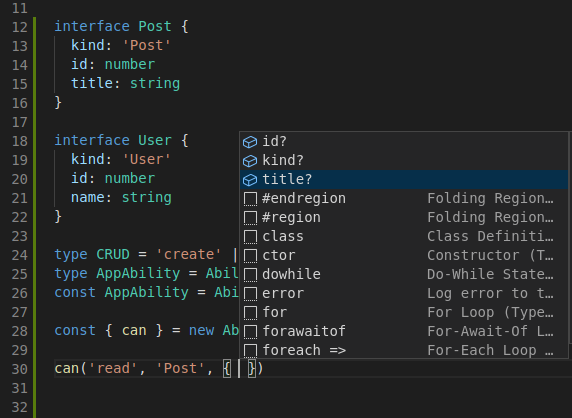
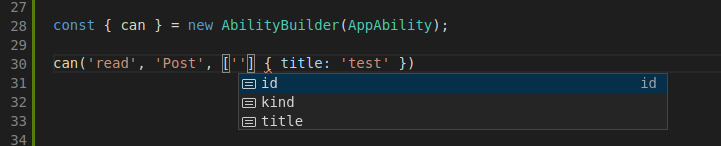
The cool thing is that all that safety is subject type dependent! Try to pass User subject type in place of Post and see it by yourself!
Nested fields with dot notation
If we need to define conditions based on nested fields, we can do this by defining a separate interface:
import { MongoAbility, createMongoAbility } from '@casl/ability';

interface User {
  kind: 'User'
  id: number
  name: string
  address: {
    street: string
    building: string
  }
}

type AppAbility = MongoAbility<['read', User | 'User']>;

const { can } = new AbilityBuilder<AppAbility>(createMongoAbility);

type FlatUser = User & {
  'address.street': User['address']['street']
};

can<FlatUser>('read', 'Post', { 'address.street': 'test' });
// It also works for fields
can<FlatUser>('read', 'Post', ['address.street'], { 'address.street': 'test' })
Useful type helpers
RawRule
Sometimes you may need to create RawRules manually (or fetch them from db). In that case, you will need to type them explicitly. Use RawRuleOf<AppAbility> in case if you have type for AppAbility or RawRuleFrom<Abilities, Conditions> otherwise.
import { MongoAbility, RawRuleOf, RawRuleFrom, MongoQuery } from '@casl/ability';

type AppAbilities = ['read' | 'update', 'Article'];
type AppAbility = MongoAbility<AppAbilities>;

const rawRules: RawRuleOf<AppAbility>[] = [
  { action: 'read', subject: 'Article' }
];

// or
type AppRawRule = RawRuleFrom<AppAbilities, MongoQuery>;
async function getRulesFromDb(): Promise<AppRawRule[]> {
  // implementation
}
RuleOf
Similar to RawRule helpers, there is a helper RuleOf<AppAbility> for Rule<Abilities, Conditions>. It's very unlikely that you will need to work with this types on application layer.
AbilityOptionsOf
Similar to RawRule, if you don't want to explicitly use AbilityOptions<Abilities, Conditions>, you can use AbilityOptionsOf<AppAbility>:
import { AbilityOptionsOf, MongoAbility, createMongoAbility } from '@casl/ability';

type AppAbilities = ['read' | 'update', 'Article'];
type AppAbility = MongoAbility<AppAbilities>;
const options: AbilityOptionsOf<AppAbility> = {
  detectSubjectType: (subject) => /* custom implementation */
};

const ability = createMongoAbility<AppAbilities>([], options);
AnyAbility and AnyMongoAbility
These 2 types represents any Ability instance and any MongoAbility instance. They are usually a good fit for restrictions in generic types. For example, this is how AnyAbility is used in AbilityBuilder:
export class AbilityBuilder<T extends AnyAbility = AnyAbility> {
  // implementation details
}
MongoQuery
There are 2 types that represents built-in mongo operators:
MongoQuery<T>is an actual mongo query.
Is used as a conditions restriction inAbilitycreated bycreateMongoAbilityfactory function.MongoQueryOperators<T>represents supported MongoDB operators and it's a union ofMongoQueryFieldOperators<T>andMongoQueryTopLevelOperators<T>that represent supported field and document level operators respectively
ForcedSubject
Represents an object (i.e., POJO) that has been casted to specific subject by using subject helper.
See Subject type detection for details